
Stage 8. Sessions
Session-based authentication follows a simple idea: server stores login state, while browser sends only a session id. This is not an outdated pattern. It remains a practical model for products that need strict access control, immediate forced logout, and centralized visibility of active user sessions.
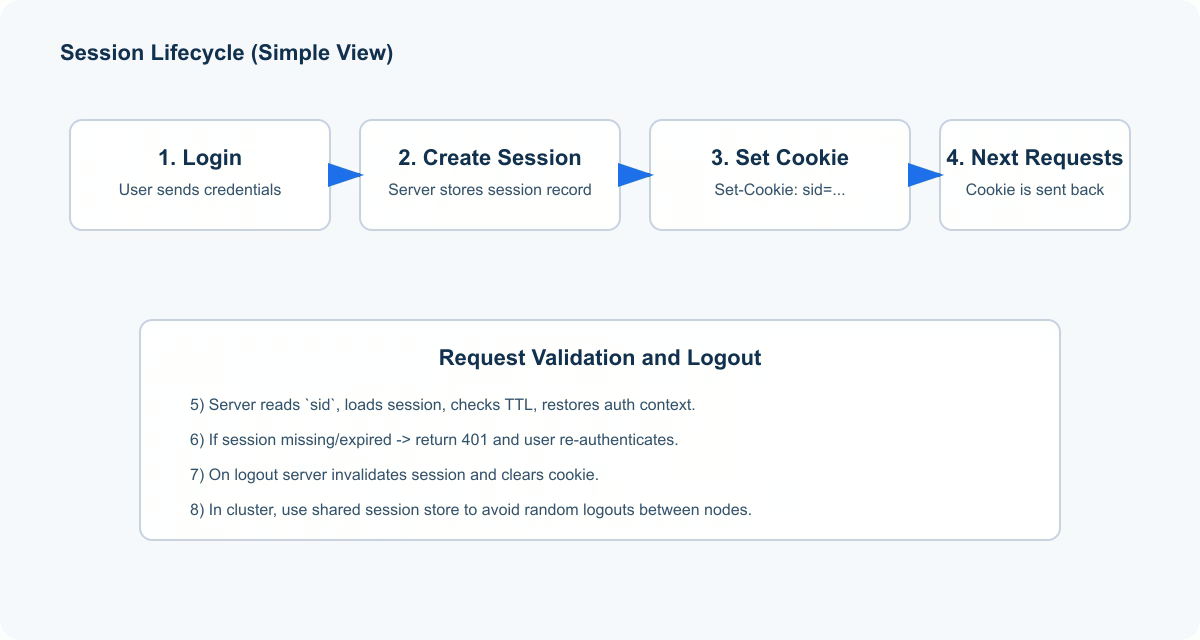
1. Session Flow Step by Step
- User signs in.
- Server creates a session record in session storage.
- Server sends session id to browser (usually via cookie).
- Browser attaches that id on later requests.
- Server loads session, checks TTL, restores authenticated context.
Set-Cookie: sid=abc123; Path=/; HttpOnly; Secure; SameSite=Lax
Beginner takeaway: request does not carry full user profile; it carries only a session identifier. Main user state stays server-side.
2. Why Teams Choose Sessions
| Benefit | Practical value |
|---|---|
| Immediate revocation | Specific session can be disabled right away |
| Centralized control | Active logins are visible and manageable |
| Predictable logout | No need to wait for token expiration |
| Better auditability | Actions can be traced through server-side session records |
That is why sessions are common in admin panels, employee portals, finance workflows, and compliance-heavy applications.
3. Common Failure Points
A classic failure is local in-memory sessions in multi-node deployment. Once traffic is distributed across nodes, users may land on an instance that does not hold their session and get random sign-outs.
Another common issue is weak session-id protection: missing HttpOnly, missing Secure, very long TTL, no session-id rotation after login. In that setup, stolen session ids are easier to reuse.
4. What to Store in Session
Good practice: keep session payload minimal, for example userId, roles, and a few technical flags. Bad practice: storing heavy object graphs, large DTOs, or sensitive business data in session. That increases memory pressure, complicates serialization, and creates upgrade and leakage risks.
5. Infrastructure Checklist for Stable Sessions
- Shared session store (for example Redis) in clustered deployments.
- Explicit TTL and session renewal policy.
- Session-id rotation after successful login.
- Symmetric cookie attributes for set/delete flows.
- Observability metrics: active sessions, expirations, forced logout, store errors.
Without this baseline, system may look fine in local development but fail unpredictably in production traffic.
Practical scenario
A team scaled from one node to three but kept local in-memory sessions. Users started getting intermittent logouts because some requests were routed to nodes without the matching session record. Support saw only a business symptom (“users are logged out sometimes”) without technical clarity. After moving to shared session storage, adding session-lookup metrics, and tightening cookie policy, behavior became stable. The core lesson is direct: session auth works well when its infrastructure assumptions are treated as first-class design requirements.