
Stage 7. Cookies
A cookie is a small state fragment that a server writes into the browser through Set-Cookie, and the browser later sends back automatically on matching requests. At first this looks simple, but real production behavior depends on browser policy, domain topology, HTTPS, SameSite, proxy layers, and frontend flow design. That is why cookies should be treated as a dedicated browser-server contract.
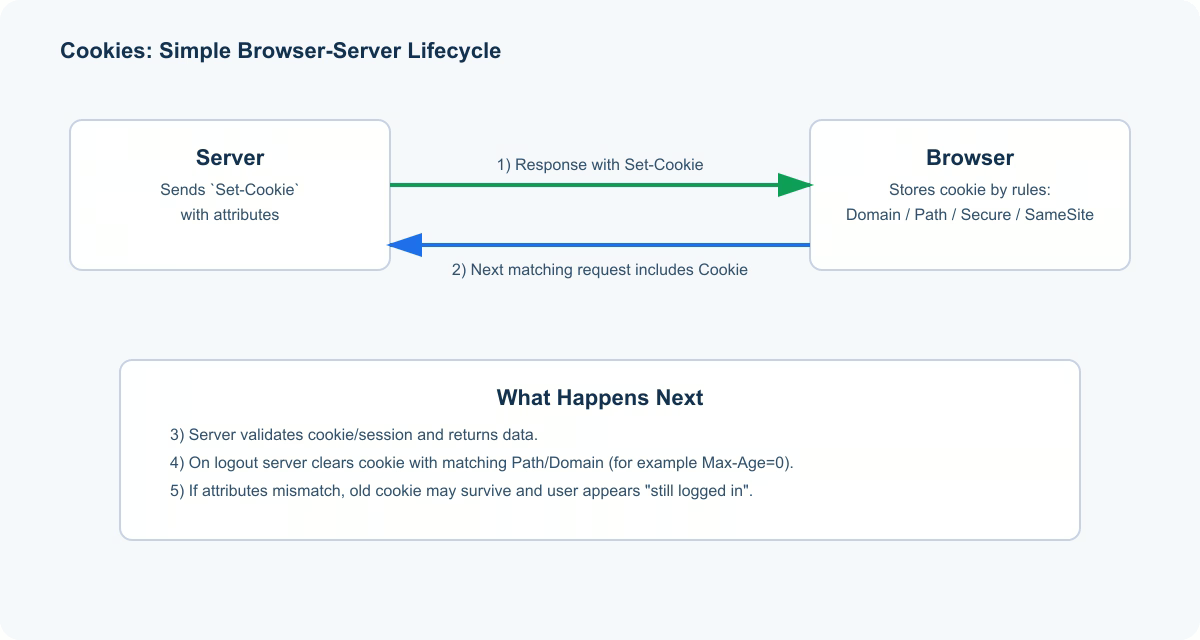
1. Cookie Flow Step by Step
- Server returns
Set-Cookiein an HTTP response. - Browser stores cookie value with attributes (
Domain,Path,Secure,HttpOnly,SameSite,Max-Age). - Browser decides whether to attach that cookie on future requests.
- Server receives cookie and maps it to session or other state.
The key beginner insight: browser, not your controller, decides cookie delivery. So backend logic may be correct while cookie still does not arrive due to attribute mismatch.
2. Minimal Cookie Set Example
Set-Cookie: sid=abc123; Path=/; HttpOnly; Secure; SameSite=Lax
This means: store sid, send it for path /, prevent script access (HttpOnly), send only over HTTPS (Secure), and apply cross-site behavior rules via SameSite=Lax.
3. High-Impact Cookie Attributes
| Attribute | What it does | Common mistake |
|---|---|---|
HttpOnly | Blocks access from page scripts | Session cookie without HttpOnly |
Secure | Sends cookie only over HTTPS | Testing only on HTTP then failing in production |
SameSite | Controls cross-site cookie sending | Wrong mode for login/redirect flow |
Domain | Defines hosts where cookie is valid | Making cookie unavailable for required subdomain |
Path | Limits URL path scope | Setting cookie on one path, deleting on another |
Max-Age/Expires | Defines cookie lifetime | Never rotating long-lived auth cookie |
4. Why Logout Often Fails
Clearing a cookie requires scope symmetry. Sending empty value is not enough; deletion must match original Path and Domain.
Set-Cookie: sid=; Path=/; Max-Age=0; HttpOnly; Secure; SameSite=Lax
If delete scope differs from set scope, old cookie may survive and users appear “partly logged out” or randomly still authenticated.
5. Cookies vs localStorage vs sessionStorage
Cookies are useful when browser must attach state automatically to HTTP requests. localStorage and sessionStorage are not auto-attached and are readable from page scripts. For sensitive session identifiers, teams usually prefer HttpOnly cookies over web storage.
6. Release Checklist
- Do all auth cookies include
HttpOnlyandSecure? - Does
SameSitematch your real login and redirect flow? - Are cookie set/delete operations symmetric in
DomainandPath? - Do tests cover cross-subdomain and logout scenarios?
- Are cookie values masked in logs and traces?
Practical scenario
A team launched a new logout endpoint and noticed some users still opened protected pages without re-login. Root cause: cookie was created with Path=/ but cleared with Path=/api. Browser treated these as different scopes and kept sending the original cookie. After aligning Path values and adding an e2e logout check across routes, behavior became consistent. The lesson is practical: in cookie-based systems, attributes define real behavior more than endpoint intent.