Stage 5. Browser to Server Flow
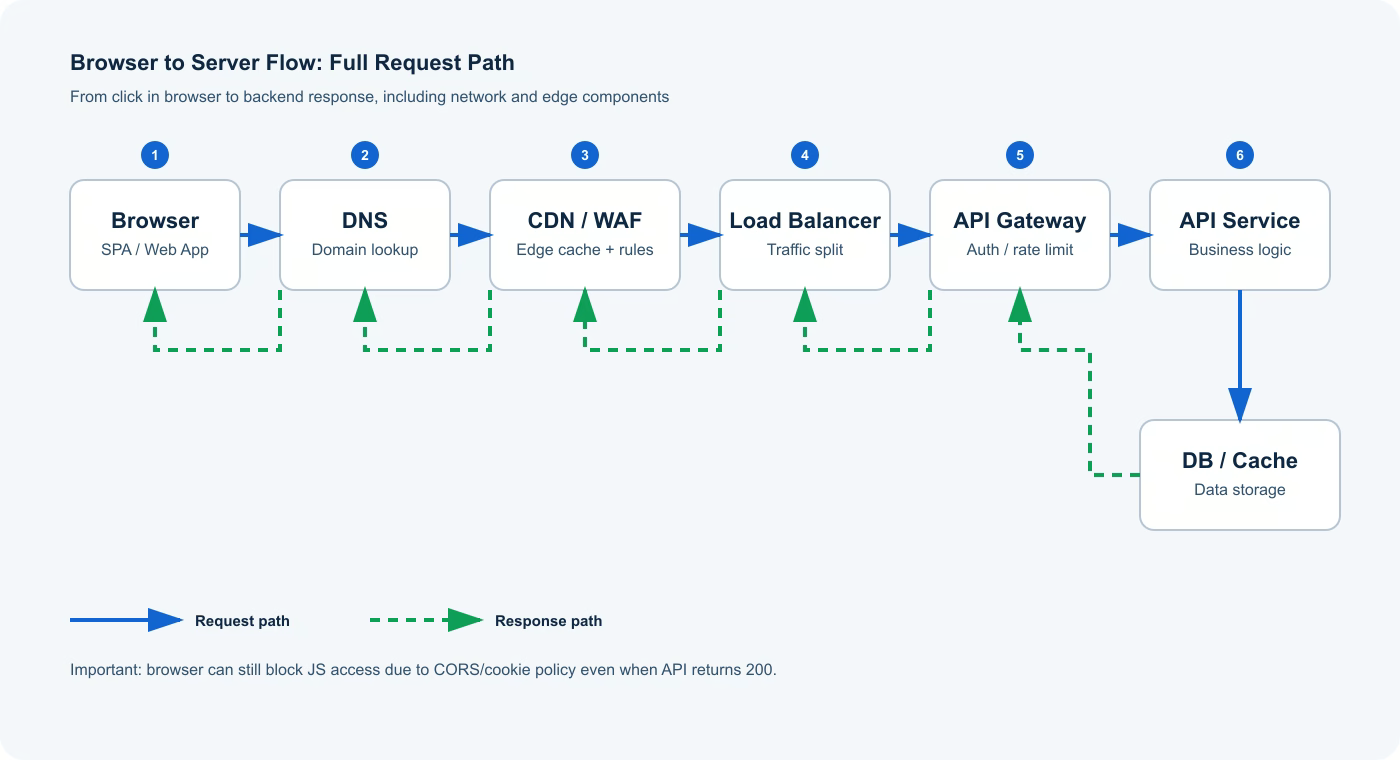
When a user clicks a button in the browser, the request crosses several network and infrastructure layers before backend business logic runs. If you inspect only endpoint code, you may miss the real source of failure. That is why engineers should understand the full path: from browser and DNS to gateway, API service, and the response path back.
1. Full Request Chain
A typical path looks like this:
- Browser builds the request: URL, method, headers, cookies, body.
- DNS resolves the domain to an IP address.
- Traffic passes through edge layer: CDN/WAF.
- Load Balancer distributes traffic across instances.
- API Gateway applies policy: auth, rate limits, routing.
- Backend API executes business logic and reads/writes DB or cache.
- Response travels back through the chain to the browser.
2. What Each Layer Does
| Layer | Role in flow | Common failure modes |
|---|---|---|
| Browser | Builds HTTP request and enforces security policies | CORS blocks, cookie policy mismatch, stale cache |
| DNS | Resolves domain to IP | Wrong records, slow lookup |
| CDN/WAF | Accelerates delivery and filters traffic | Stale cached content, rule-based blocking |
| Load Balancer | Distributes requests to healthy instances | Bad health checks, uneven traffic split |
| API Gateway | Enforces token, limits, and routing | Header loss, misconfigured limits |
| API Service | Runs business logic | Code defects, state conflicts |
| DB/Cache | Stores and serves data | Timeouts, outdated data |
3. Why 200 OK Does Not Always Mean User Success
Even when backend returns 200, browser policy can still block JavaScript from reading the response. A common case is incomplete CORS headers: API responds technically, but browser hides the body from client code. Users experience "it does not work," while server logs still look healthy.
4. Which Network Components the Request Passes Through
Use this compact map for memory:
flowchart LR
  A[Browser] --> B[DNS]
  B --> C[CDN/WAF]
  C --> D[Load Balancer]
  D --> E[API Gateway]
  E --> F[API Service]
  F --> G[(DB/Cache)]
  G --> F
  F --> E
  E --> D
  D --> C
  C --> A
Real production environments may add more hops, but the core architecture is usually similar: edge, routing, service logic, data layer, and response return path.
5. Layer-by-Layer Debug Checklist
- In DevTools, inspect
Network,Headers,Timing, and preflightOPTIONS. - Verify actual sent/received headers (
Origin,Authorization,Set-Cookie,Cache-Control). - Correlate
X-Request-Idacross gateway and backend logs. - Check whether CDN/proxy returned stale cached response.
- Only then move to endpoint business-code analysis.
Practical scenario
A team observed stable 200 for GET /profile, but SPA still failed to render user data after login. Investigation found that API Gateway was not forwarding Access-Control-Allow-Credentials, so browser blocked response access for cookie-based calls. After fixing CORS policy, invalidating edge cache, and adding an e2e check for this path, behavior became stable. The lesson is direct: web reliability depends on the whole browser-to-server chain, not only endpoint code.